> ## Documentation Index
> Fetch the complete documentation index at: https://shapesinc-4644c49f-cursor-docs-product-refresh-1067.mintlify.site/llms.txt
> Use this file to discover all available pages before exploring further.
# Shape Settings Reference
> Every setting on a Shape, what it does, and where to find it, from the Create Shape flow through every tab of the Creator Dashboard. The complete reference for building and tuning your own AI.
This is the full map of every setting on a Shape. Use it as a reference while you build. For the *why* behind these choices, read [Designing Great Shapes](/designing-shapes) first.
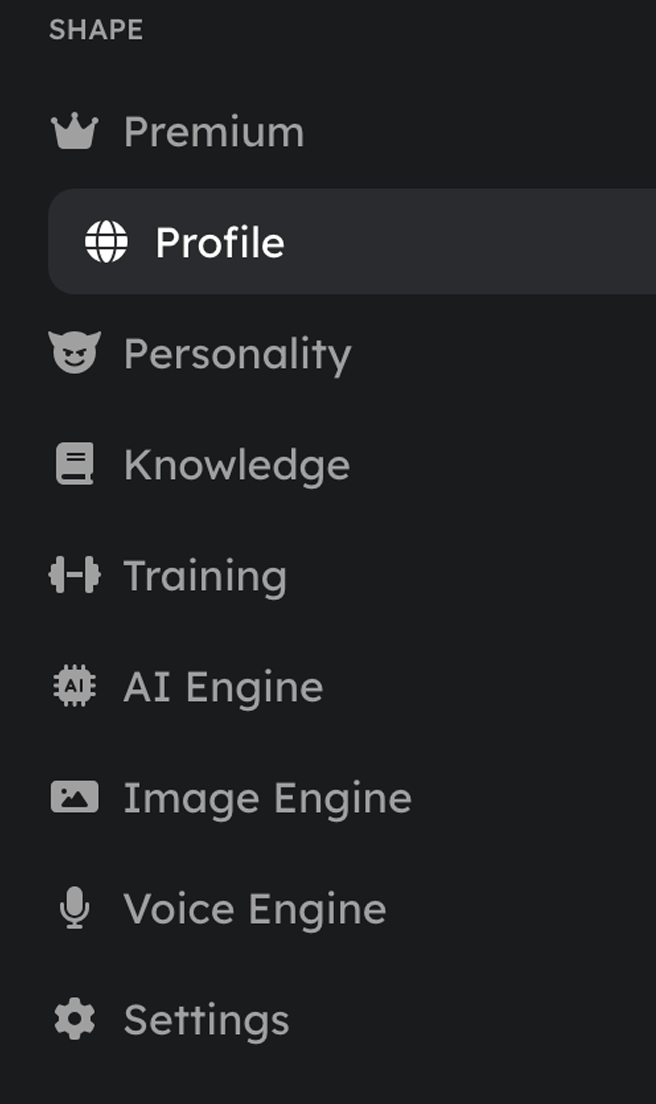
Settings live in two places: the **Create Shape** flow (the essentials, when you first make a Shape) and the **Creator Dashboard** (everything, anytime after). Open the dashboard at [shapes.inc/dashboard](https://shapes.inc/dashboard).
 ## Create Shape
The minimum to get a Shape live. You can change all of it later.
| Setting | What it does |
| ------------------- | ------------------------------------------------------------------------------------------------------------------ |
| **Name** | The display name shown in chat. It also seeds the Shape's username. |
| **Short backstory** | One or two sentences on who the Shape is. The most important thing you'll write, so give it a clear point of view. |
| **Response style** | The starting [preset](/presets) for how it writes. Pick a named style or go custom. |
| **Tags** | Keywords that help people discover your Shape (up to 10). |
| **Avatar / banner** | The Shape's profile picture and header image. |
Prefer a guided build? The in-app **Shape Builder** walks you through name, backstory, persona, model, reply style, description, art, and training examples step by step.
## Personality
Who the Shape is. Keywords beat paragraphs here. See [When Less Is More](/shortguide).
| Setting | What it does |
| --------------------------- | -------------------------------------------------------------------------------------------------------------------------------- |
| **Name** | Display name. |
| **Short backstory** | The core one-liner identity. |
| **Response style / preset** | How it writes (length, format, voice). Uses the `{shape}` and `{user}` variables. |
| **Initial message** | What the Shape opens with when someone starts a conversation. |
| **Personality traits** | A few adjectives: `loyal, dry, slow to trust`. |
| **Tone** | The mood of its speech: `warm, unhurried`. |
| **Age** | The character's age. |
| **Birthday** | A day and month for the character. |
| **Story** | A longer history. Keep it relevant, not exhaustive. |
| **Likes / dislikes** | Simple lists. No need to explain why. |
| **Conversational goals** | 2–3 objectives that steer how it engages. |
| **Conversational examples** | A couple of authentic snippets that show its voice. |
| **Appearance** | How it looks. Used for image generation and "what do you look like?" |
| **Custom messages** | The **wack message** (sent when short-term memory is cleared) and the **sleep message** (sent when it saves a long-term memory). |
## Knowledge
A searchable bank of facts the Shape pulls from when relevant. Three types:
* **General:** lore, backstory, facts, personality details.
* **Commands:** custom responses for triggers like `!rules` or `!help`.
* **Relationships:** how the Shape should treat specific people.
More is not better. Knowledge is recalled by relevance, and an overstuffed bank makes recall *worse*. Add only what the model wouldn't already know. This is the single most common reason a Shape feels off.
Recall is tunable from the AI Engine tab:
* **Knowledge context size:** how many entries can be pulled into a reply (default 30).
* **Knowledge relevance:** how closely an entry must match to be used. Lower pulls in more but looser; higher pulls in fewer but tighter.
## Training
Input/output examples that *guide* how the Shape replies. It learns the pattern instead of repeating them word for word. The more representative examples you add, the more consistent its voice.
* **Training context size:** how many examples can inform a reply (default 30).
* **Training relevance:** how closely an example must match the current message to be used.
## AI Engine
The model the Shape runs on, plus generation controls.
| Setting | What it does |
| --------------------------- | -------------------------------------------------------------------------------------- |
| **Primary engine** | The main model powering the Shape. See [Which Model Should I Use?](/choosing-a-model). |
| **Fallback engine** | The model used if the primary is unavailable. |
| **Show internal monologue** | When a reasoning-capable model is selected, optionally surface its thinking. |
| **Base preset** | The core response-style instructions (same field as the Personality preset). |
| **Language preset** | The Shape's default language. |
| **Timezone** | The timezone the Shape uses for time awareness. |
### Advanced engine parameters
These shape the raw output of the model. The defaults are good, so **don't change them unless you know what they do.**
* **Temperature:** how random or creative the replies are (default `0.95`). Higher is wilder, lower is more focused.
* **Top P:** how wide a pool of word choices the model draws from.
* **Top K:** limits choices to the most likely options.
* **Min P** and **Top A:** extra filters on which word choices are allowed.
* **Repetition penalty:** discourages repeating the same text.
* **Frequency** and **presence penalty:** push the model toward fresh wording and new topics.
Change one at a time and test in chat. Small moves have big effects.
### Short-term memory (STM)
The window of recent messages the Shape reasons over.
* **STM window:** the number of recent messages kept in context (default 15). Set it to 0 to turn STM off.
### Long-term memory (LTM)
Durable memories recalled across conversations. On by default.
| Setting | What it does |
| ----------------------------- | ------------------------------------------------------------------------------------------------------------------------------- |
| **Enable LTM** | Turn long-term memory on or off. |
| **Auto-generate** | Let the Shape create memories automatically. Turn off to only save via `/sleep`. |
| **Generation frequency** | How often new memories are written (e.g. every 30 minutes). |
| **LTM engine + instructions** | The model and the prompt used to summarize conversations into memories. Worth tuning, since it controls *what* gets remembered. |
| **Memory context size** | How many memories can be recalled into a reply (default 30). |
| **Memory relevance** | How closely a memory must match to be recalled. Lower recalls more, higher recalls fewer but more relevant. |
See the [Memory Guide](/memory) for the full picture and a sample LTM instruction preset.
## Image Engine
Controls the `/imagine` command and the images your Shape draws.
| Setting | What it does |
| ---------------------------- | ------------------------------------------------------------------------------------------------ |
| **Image engine** | The model that generates images: **Nano Banana** (fast) or **Nano Banana Pro** (higher quality). |
| **Image preset** | Standing instructions for how the Shape draws (style, subject defaults). |
| **Size** | Square, portrait, or landscape, in standard and HD options. |
| **Always use the same size** | Lock to one size, or let the Shape pick per image. |
## Voice Engine
Gives your Shape audio replies. Full walkthrough in [Give Your Shape a Voice](/how-to-give-your-shape-a-voice).
| Setting | What it does |
| ----------------- | -------------------------------------------------------------------------------------------- |
| **Voice** | Choose a pre-made voice from the catalog, or upload a custom audio/video sample (up to 4MB). |
| **Frequency** | How often the Shape replies with audio instead of text. |
| **Send captions** | Include the text transcript alongside the voice message. |
| **Latency mode** | Trade a little quality for faster generation. |
* **Speed:** how fast it speaks.
* **Variation:** how much the delivery changes from message to message.
* **Exploration:** how freely the voice model interprets the text.
* **Voice instructions:** guidance for how the Shape should sound when speaking, and how voice messages show up in history.
## Profile & branding
How your Shape appears to the world and in discovery.
| Setting | What it does |
| --------------------------------------------------------------------------------------------------- | ------------------------------------------------------------------------------- |
| **Avatar / banner** | Profile picture and header. |
| **Tagline** | A short one-liner (up to 60 characters). |
| **SEO description** | A longer description that helps people find your Shape (up to 1000 characters). |
| **Tags** | Discovery keywords. |
| **Category** | The Shape's primary category (with a custom option). |
| **Custom HTML / CSS** | Style the profile page yourself once enabled. See the [CSS guide](/css). |
| **Example prompts, typical phrases, source material, character universe & background, screenshots** | Optional context that improves discovery and first impressions. |
## Settings (general)
The controls that govern access and safety.
| Setting | What it does |
| ----------------------------- | -------------------------------------------------------------- |
| **Owners** | Add co-owners who can help manage and edit the Shape. |
| **Sensitive content** | Decide whether the Shape can produce mature content. |
| **Discoverable / searchable** | Whether the Shape shows up in search, or stays private to you. |
| **Allow message editing** | Whether users can edit the Shape's messages. |
| **Duplicate** | Make a full copy of the Shape with all its settings. |
| **Delete** | Permanently remove the Shape (in the Danger Zone). |
The craft guide that turns these knobs into a Shape people love.
Full configs you can adapt for your own.
[Open your dashboard](https://shapes.inc/dashboard)
## Create Shape
The minimum to get a Shape live. You can change all of it later.
| Setting | What it does |
| ------------------- | ------------------------------------------------------------------------------------------------------------------ |
| **Name** | The display name shown in chat. It also seeds the Shape's username. |
| **Short backstory** | One or two sentences on who the Shape is. The most important thing you'll write, so give it a clear point of view. |
| **Response style** | The starting [preset](/presets) for how it writes. Pick a named style or go custom. |
| **Tags** | Keywords that help people discover your Shape (up to 10). |
| **Avatar / banner** | The Shape's profile picture and header image. |
Prefer a guided build? The in-app **Shape Builder** walks you through name, backstory, persona, model, reply style, description, art, and training examples step by step.
## Personality
Who the Shape is. Keywords beat paragraphs here. See [When Less Is More](/shortguide).
| Setting | What it does |
| --------------------------- | -------------------------------------------------------------------------------------------------------------------------------- |
| **Name** | Display name. |
| **Short backstory** | The core one-liner identity. |
| **Response style / preset** | How it writes (length, format, voice). Uses the `{shape}` and `{user}` variables. |
| **Initial message** | What the Shape opens with when someone starts a conversation. |
| **Personality traits** | A few adjectives: `loyal, dry, slow to trust`. |
| **Tone** | The mood of its speech: `warm, unhurried`. |
| **Age** | The character's age. |
| **Birthday** | A day and month for the character. |
| **Story** | A longer history. Keep it relevant, not exhaustive. |
| **Likes / dislikes** | Simple lists. No need to explain why. |
| **Conversational goals** | 2–3 objectives that steer how it engages. |
| **Conversational examples** | A couple of authentic snippets that show its voice. |
| **Appearance** | How it looks. Used for image generation and "what do you look like?" |
| **Custom messages** | The **wack message** (sent when short-term memory is cleared) and the **sleep message** (sent when it saves a long-term memory). |
## Knowledge
A searchable bank of facts the Shape pulls from when relevant. Three types:
* **General:** lore, backstory, facts, personality details.
* **Commands:** custom responses for triggers like `!rules` or `!help`.
* **Relationships:** how the Shape should treat specific people.
More is not better. Knowledge is recalled by relevance, and an overstuffed bank makes recall *worse*. Add only what the model wouldn't already know. This is the single most common reason a Shape feels off.
Recall is tunable from the AI Engine tab:
* **Knowledge context size:** how many entries can be pulled into a reply (default 30).
* **Knowledge relevance:** how closely an entry must match to be used. Lower pulls in more but looser; higher pulls in fewer but tighter.
## Training
Input/output examples that *guide* how the Shape replies. It learns the pattern instead of repeating them word for word. The more representative examples you add, the more consistent its voice.
* **Training context size:** how many examples can inform a reply (default 30).
* **Training relevance:** how closely an example must match the current message to be used.
## AI Engine
The model the Shape runs on, plus generation controls.
| Setting | What it does |
| --------------------------- | -------------------------------------------------------------------------------------- |
| **Primary engine** | The main model powering the Shape. See [Which Model Should I Use?](/choosing-a-model). |
| **Fallback engine** | The model used if the primary is unavailable. |
| **Show internal monologue** | When a reasoning-capable model is selected, optionally surface its thinking. |
| **Base preset** | The core response-style instructions (same field as the Personality preset). |
| **Language preset** | The Shape's default language. |
| **Timezone** | The timezone the Shape uses for time awareness. |
### Advanced engine parameters
These shape the raw output of the model. The defaults are good, so **don't change them unless you know what they do.**
* **Temperature:** how random or creative the replies are (default `0.95`). Higher is wilder, lower is more focused.
* **Top P:** how wide a pool of word choices the model draws from.
* **Top K:** limits choices to the most likely options.
* **Min P** and **Top A:** extra filters on which word choices are allowed.
* **Repetition penalty:** discourages repeating the same text.
* **Frequency** and **presence penalty:** push the model toward fresh wording and new topics.
Change one at a time and test in chat. Small moves have big effects.
### Short-term memory (STM)
The window of recent messages the Shape reasons over.
* **STM window:** the number of recent messages kept in context (default 15). Set it to 0 to turn STM off.
### Long-term memory (LTM)
Durable memories recalled across conversations. On by default.
| Setting | What it does |
| ----------------------------- | ------------------------------------------------------------------------------------------------------------------------------- |
| **Enable LTM** | Turn long-term memory on or off. |
| **Auto-generate** | Let the Shape create memories automatically. Turn off to only save via `/sleep`. |
| **Generation frequency** | How often new memories are written (e.g. every 30 minutes). |
| **LTM engine + instructions** | The model and the prompt used to summarize conversations into memories. Worth tuning, since it controls *what* gets remembered. |
| **Memory context size** | How many memories can be recalled into a reply (default 30). |
| **Memory relevance** | How closely a memory must match to be recalled. Lower recalls more, higher recalls fewer but more relevant. |
See the [Memory Guide](/memory) for the full picture and a sample LTM instruction preset.
## Image Engine
Controls the `/imagine` command and the images your Shape draws.
| Setting | What it does |
| ---------------------------- | ------------------------------------------------------------------------------------------------ |
| **Image engine** | The model that generates images: **Nano Banana** (fast) or **Nano Banana Pro** (higher quality). |
| **Image preset** | Standing instructions for how the Shape draws (style, subject defaults). |
| **Size** | Square, portrait, or landscape, in standard and HD options. |
| **Always use the same size** | Lock to one size, or let the Shape pick per image. |
## Voice Engine
Gives your Shape audio replies. Full walkthrough in [Give Your Shape a Voice](/how-to-give-your-shape-a-voice).
| Setting | What it does |
| ----------------- | -------------------------------------------------------------------------------------------- |
| **Voice** | Choose a pre-made voice from the catalog, or upload a custom audio/video sample (up to 4MB). |
| **Frequency** | How often the Shape replies with audio instead of text. |
| **Send captions** | Include the text transcript alongside the voice message. |
| **Latency mode** | Trade a little quality for faster generation. |
* **Speed:** how fast it speaks.
* **Variation:** how much the delivery changes from message to message.
* **Exploration:** how freely the voice model interprets the text.
* **Voice instructions:** guidance for how the Shape should sound when speaking, and how voice messages show up in history.
## Profile & branding
How your Shape appears to the world and in discovery.
| Setting | What it does |
| --------------------------------------------------------------------------------------------------- | ------------------------------------------------------------------------------- |
| **Avatar / banner** | Profile picture and header. |
| **Tagline** | A short one-liner (up to 60 characters). |
| **SEO description** | A longer description that helps people find your Shape (up to 1000 characters). |
| **Tags** | Discovery keywords. |
| **Category** | The Shape's primary category (with a custom option). |
| **Custom HTML / CSS** | Style the profile page yourself once enabled. See the [CSS guide](/css). |
| **Example prompts, typical phrases, source material, character universe & background, screenshots** | Optional context that improves discovery and first impressions. |
## Settings (general)
The controls that govern access and safety.
| Setting | What it does |
| ----------------------------- | -------------------------------------------------------------- |
| **Owners** | Add co-owners who can help manage and edit the Shape. |
| **Sensitive content** | Decide whether the Shape can produce mature content. |
| **Discoverable / searchable** | Whether the Shape shows up in search, or stays private to you. |
| **Allow message editing** | Whether users can edit the Shape's messages. |
| **Duplicate** | Make a full copy of the Shape with all its settings. |
| **Delete** | Permanently remove the Shape (in the Danger Zone). |
The craft guide that turns these knobs into a Shape people love.
Full configs you can adapt for your own.
[Open your dashboard](https://shapes.inc/dashboard)